
Character
MyTown World uses a character system that is not flexible enough to create the animations that are required. Because the game has over 100 characters it could be the case that 20 characters are visible at a time. Because we are supporting low end devices as of now, we need to be careful about performance. We experimented with Spine and Unity's 2D Animation package and came to the conclusion that Unity's 2D animation is more suited to our needs.
Using the bone tools we created the skeleton of the characters, because of the performance limitation we needed to remove the skinning component which resolved the issue but morphing the images is no longer possible. We think that this is an acceptable sacrifice for performance gain.
Animations
In the beginning, we should do one animation and see if we can make it work. There are things that we need to take into consideration like the character can hold objects in his hands while he is doing the animation and the length of the animation, characters can wear different clothing, the length of the animation, or if it's a one-shot animation or it needs to be looped.
- Lift - This happens when the character is grabbed by the user,
- Fall - When the user lets go
- Drag Left - When the character is being dragged left to show inertia ( we can blend animations)
- Drag Right - When the character is being dragged right show inertia ( we can blend animations)
- Idle - When the character is not doing anything, this should be loopable
- Sitting - When a character is placed in a sitting position
- Place - When a character is placed on the ground instead of falling to it
- Eat/Drink - Consuming things, moving his hands to his face and back
- Dressup - Animations of excitement and happiness when a character is dressed
We should start with the Lifting animations first then move to Fall, and then the dragging ones. These will be the most used animations. After we have these, we will have a better understanding of what other limitations we have that we haven't noticed.
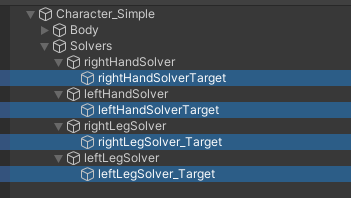
There are IK handles made, you can select them by clicking on them or by selecting them from the Hierarchy window.
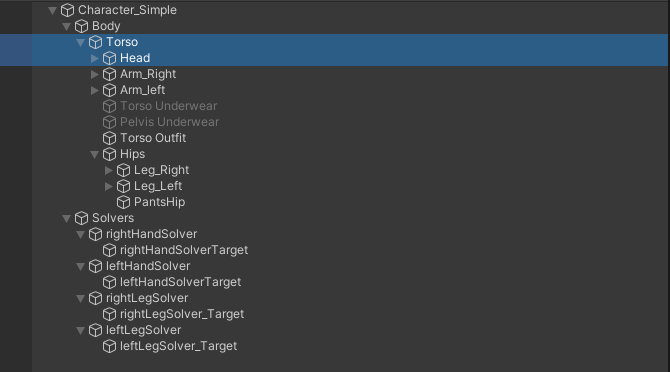
For body movement and rotation the Thorso element. And for Head rotation use the Head element.
Limitations
The rig was made by developers so there might be things that should be changed for easier animating. This should be done in a way that the developers approve it as well. After the changes, nothing should be changed, the character needs to be the same the only differences can be positioning and rotation.
- Anchor points should not be changed
- The hierarchy should not be changed
- Moving bones or images ( they should be at 0,0,0), should be rotated only
- The characters should always return to their original position at the end of an animation
- Only one Animator can be on the body
Requirements to start
- You can find the project here https://www.dropbox.com/s/s4syhfpbxc1i3r8/CharacterAnimations.zip?dl=0
- You will need Unity version 2021.3.11f
- Tutorial for Animation / Animator https://www.youtube.com/watch?v=JVFg9g4f-ME&ab_channel=KetraGames
No Comments